
Learn · Guide 9 of 10
Publish
Check the cut, export it at the right loudness and package everything you paste into YouTube.
Run the checklist
⌥⌘P, or . Blockers include clipped words, cut-off text, text outside the safe area and failed renders. Warnings include silences, black gaps, overlapping music and leftover placeholder text. Reminders cover chapters, captions, thumbnail, description and paid promotion. Click an item to jump there, and tick reminders off.
Export
⌘E. Every export is measured: integrated loudness (YouTube wants −14 LUFS) and true peak (at most −1 dBTP). If it’s off, the report offers Jump to the peak and Apply master gain.
Add chapters
⌥⌘M. Chapters are orange flags on the ruler, and chapter-card graphics count too. HTCUT checks YouTube’s rules: at least three chapters, each at least 10 seconds, starting at 0:00.
Write the post
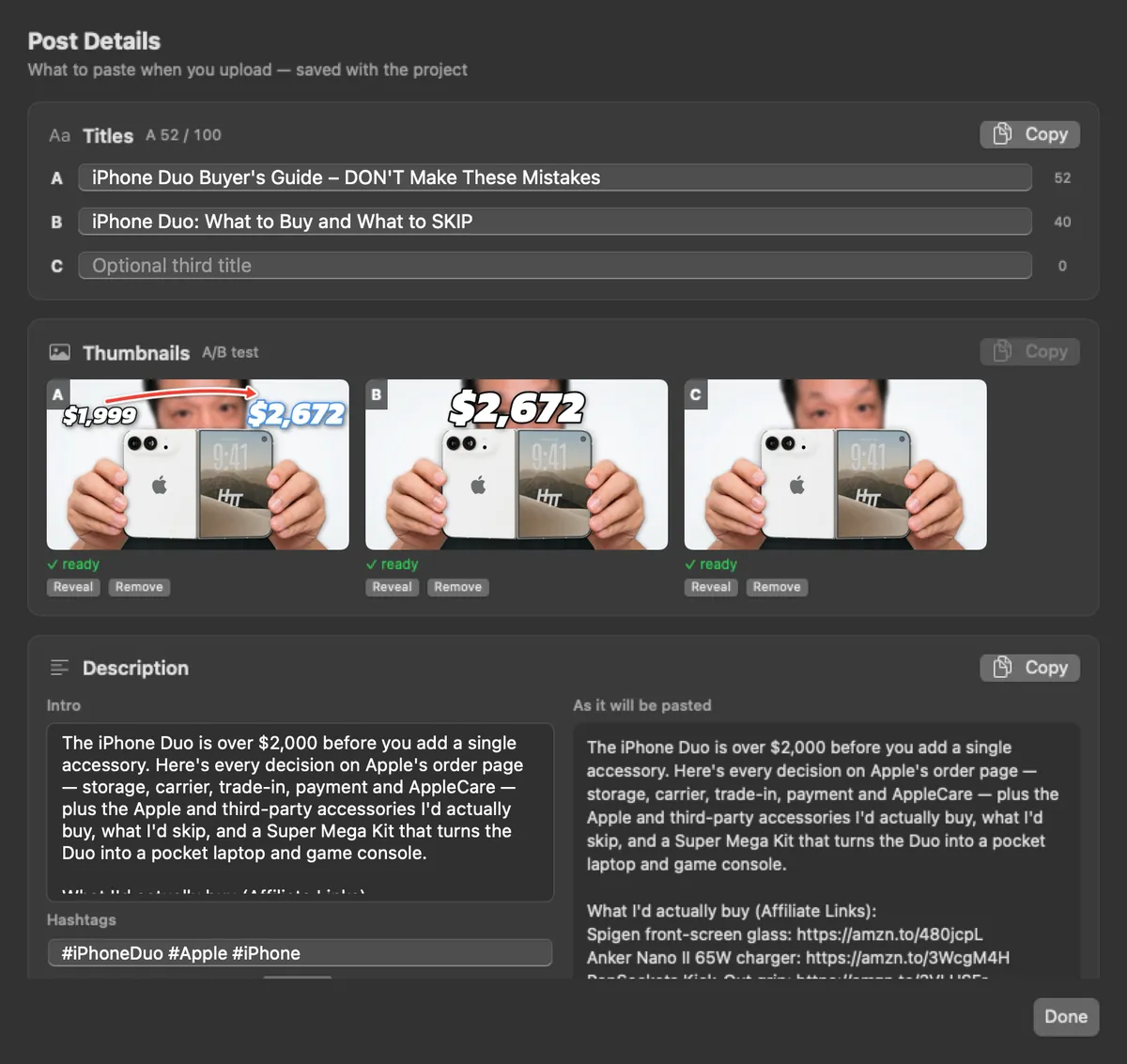
⇧⌘E: up to three titles and three thumbnails for YouTube’s Test & Compare, the description (your intro, the chapter list, your footer and hashtags) and a pinned comment, each with a Copy button. Thumbnails are checked against YouTube’s rules: JPG or PNG, 2 MB or less, 16:9, at least 1280×720.
Pick thumbnail frames
finds your best face moments (eyes open, expressive, sharp) and saves them as full-resolution frames in
export/thumbs/. Drag them out into your thumbnail app.Share for review
saves named versions (restoring one is a single undoable edit), makes a 720p review copy with a review page, and shares it on your local network. Viewers leave comments stamped with the time; they show up as purple ticks on your ruler. Nothing is published to the internet.
The same from the terminal
$ htcut check
$ htcut preflight
$ htcut jobs --wait
$ htcut export -o export/final.mp4 --preset h264_2160
$ htcut export -o /tmp/bit.mp4 --from 2:00 --to 2:06
$ htcut chapters add --at 4:38 "Accessories"
$ htcut description --title "A title" --title-b "Another title"
$ htcut post
$ htcut thumbs --count 12
$ htcut review make